Results day for O Level and A Level students in Pakistan comes twice a year in August for the May/June series and in January for the October/November series. For the May/June 2026 series, both O Level and A Level results will be released on Tuesday, 11 August 2026 at 06:00 BST (approximately 10:00–11:00 AM PKT).
For most Pakistani students, the process is straightforward: your school provides your login credentials, you log into the CAIE MyResults portal, and your grades appear. But for many students particularly private candidates, those whose schools have not communicated clearly, or students dealing with result errors the process raises a series of questions that no one properly answers in advance.
This guide covers everything: how to check results online step-by-step, what your Statement of Results contains, what to do if something looks wrong, how to request a re-mark, how to collect physical results, and what the critical next steps are after results day.
Official CAIE Results Dates for Pakistan (2025 & 2026)
Before checking results, you need to know when they will be released. CAIE publishes results on a fixed schedule:
| Series | O Level & IGCSE Results | A Level & AS Level Results | Time (PKT) |
| Oct/Nov 2025 | Thursday, 15 January 2026 | Friday, 9 January 2026 | ~10:00–11:00 AM PKT (06:00 BST) |
| May/June 2025 | Tuesday, 19 August 2025 | Tuesday, 12 August 2025 | ~10:00 AM PKT (06:00 BST) |
| May/June 2026 | Tuesday, 11 August 2026 | Tuesday, 11 August 2026 | ~10:00–11:00 AM PKT |
Note on timing: Pakistan is UTC+5. In August, the UK is on British Summer Time (BST = UTC+1), so 06:00 BST = 10:00 AM PKT. In January, the UK is on GMT (UTC+0), so 06:00 GMT = 11:00 AM PKT. Plan your results-checking accordingly.
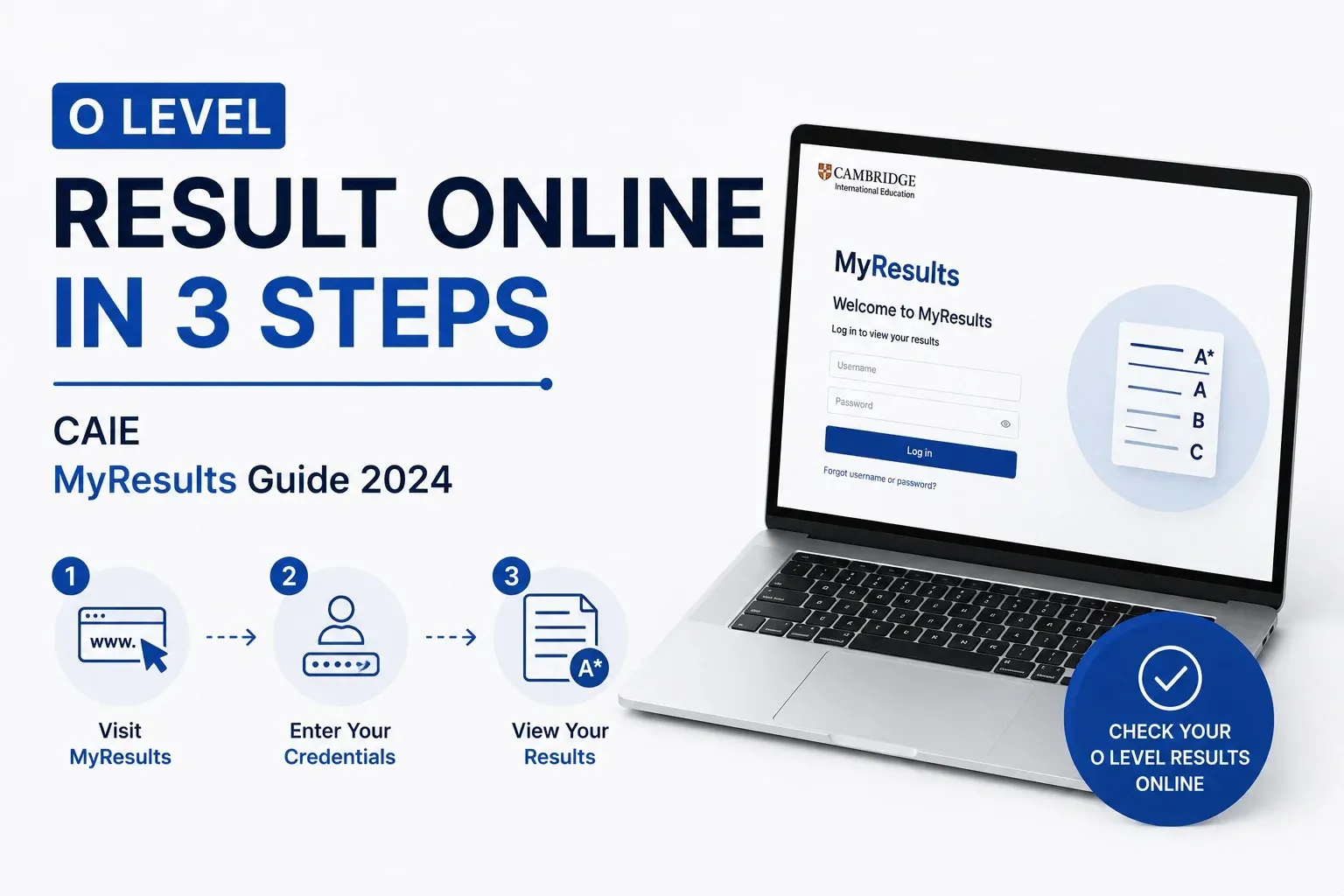
How to Check Your O Level Result Online: 3 Steps
The CAIE Cambridge Candidate Results portal is the official online system for checking results. The URL is myresults.cie.org.uk/cie-candidate-results/login. Here is the complete step-by-step process:
Step 1: Get Your Login Credentials From Your School
Before results day, your school or exam centre will issue you a username (or candidate number) and a password. These are your personal login credentials for the CAIE MyResults portal.
From the British Council Pakistan official results page (britishcouncil.pk): ‘Your local British Council office or school will provide you with the necessary login details to access your results.’
If you are a school candidate, your exams officer or teacher will distribute credentials before results day usually via email, WhatsApp group, or in person. If you are a private candidate registered through British Council, your login details will be sent to your registered email address in the days before results are released.
| Candidate Type | How Login Credentials Are Provided | What To Do If You Don’t Have Them |
| School candidate | School exams officer provides username and password — typically issued 1–3 days before results day via email or school communication | Contact your school’s exams officer before results day; do not wait until the morning of results |
| Private candidate (British Council) | British Council emails credentials to your registered email address before results day | Check your spam/junk folder; contact British Council Pakistan at info@britishcouncil.org.pk if not received |
Do not lose your credentials: Your username and password are not reissued automatically after results day. If you need to access your results again later (e.g. for IBCC application verification), you will need these same credentials. Store them safely.
Step 2: Log Into the CAIE MyResults Portal
On results day (or any time after results are released), follow these steps:
- Open a web browser on your phone, tablet, or computer.
- Go to: myresults.cie.org.uk/cie-candidate-results/login
- Enter your username (or candidate number) in the first field.
- Enter your password in the second field.
- Click the Login or Submit button.
- Your results will appear on screen, listing each subject and the grade achieved.
High traffic on results day: The CAIE MyResults portal experiences very high traffic the moment results go live at 06:00 BST. If the portal is slow or unresponsive immediately at 10:00 AM PKT, wait 15–20 minutes and try again. Your results will not disappear they are accessible at any time after the release.
Step 3: Download and Save Your Results
Once logged in, you will see your complete results. Do the following immediately:
- Read through every subject and confirm your name, candidate number, and centre number at the top of the page are correct.
- Check that all subjects you sat for are listed. A missing subject is rare but should be reported to your school immediately.
- Take a screenshot or use the download/print function to save a PDF copy of your results.
- Note down or screenshot your individual grades for every subject.
Download immediately: The Statement of Results displayed online is valid for IBCC purposes for only 6 months from the date of issue. Download and save a PDF copy on results day itself. Do not rely on being able to access the portal weeks later without your login credentials.
Understanding Your Statement of Results: What Everything Means
The printed or downloaded Statement of Results is the official document you use for IBCC equivalence, college applications, and verification. Here is what every element means:
| Element on Statement | What It Is | Why It Matters |
| Candidate Name | Your full name as registered with CAIE | Must match exactly with your CNIC/B-Form for IBCC application; any mismatch requires correction before applying |
| Candidate Number | Your unique 4-digit candidate number (within your centre) | Used to log into MyResults; needed for post-results service requests |
| Centre Number | Your school or exam centre’s CAIE registration number | Identifies your exam centre; used in post-results requests and certificate verification |
| Syllabus Code | The 4-digit code identifying each subject (e.g. 5054 = Physics, 4024 = Maths) | Used to identify papers for IBCC; used when downloading past papers and mark schemes |
| Grade | Your letter grade for each subject: A*, A, B, C, D, E or U | The primary metric for IBCC equivalence and university admissions |
| Exam Session | The series and year (e.g. May/June 2026) | Confirms which exam cycle your results are from; important for IBCC processing |
Alternative Ways to Collect Results in Pakistan
Not all students check results online. There are several ways results are distributed to Pakistani students:
| Method | How It Works | Who Uses It | Source |
| Online — CAIE MyResults Portal | Log into myresults.cie.org.uk with school-issued credentials | Most school candidates; most convenient method | CAIE official; British Council Pakistan; Out-Class.org |
| School Distribution | School exams officer prints and distributes results slips to students in person on results day | Very common in Pakistan; most schools hand out printed slips alongside telling students to check online | British Council Pakistan: ‘Results will be communicated to students by their respective schools.’ |
| Posted to Home Address | Results sent to registered home address (less common; mostly used for private candidates in some cases) | Some private candidates | British Council Pakistan results page |
The Original Cambridge Certificate: When It Arrives and What to Do
The Statement of Results you receive on results day is NOT the original certificate. It is a provisional document. The original Cambridge International Certificate is a separate, official document issued weeks after results.
| Document | When Issued | Validity for IBCC | What It Looks Like |
| Statement of Results (online/printed) | On results day (August 2026 for May/June series) | Valid for IBCC for 6 months from date of issue | A4 document listing all subjects and grades; issued by CAIE or via school |
| Original Cambridge Certificate | Dispatched by CAIE approximately 4–8 weeks after results; arrives at school/British Council | Permanently valid for IBCC (no expiry) | Formal certificate with embossed CAIE seal; harder-quality paper; individual subject certificates may also be issued |
The original certificate is sent to your school (for school candidates) or British Council (for private candidates). Your school will notify you when it arrives and arranges distribution or collection.
What to Do Immediately After Seeing Your O Level Results
Results day triggers a sequence of time-sensitive actions. Here is the correct order of steps:
| Priority | Action | Timeline | Why It Cannot Wait |
| 1 — Urgent | Apply for IBCC O Level SSC Equivalence at services.ibcc.edu.pk | Same day or within 1–2 days of results | IBCC processing takes 15–20 working days; A Level college applications open August–September; missing the equivalence means missing admission deadlines |
| 2 — Important | Check IBCC subject requirements: do you have 8 subjects including English, Maths, Urdu, Islamiyat, Pakistan Studies + 3 electives at Grade E or above? | Results day | If any compulsory subject is missing or below Grade E, you are not eligible for full IBCC equivalence — you need to know this immediately to plan resits |
| 3 — Time-Sensitive | If results are unexpected (significantly lower than expected): request component grades breakdown from British Council | Within 1 week of results | British Council Pakistan: ‘Before applying to have your paper remarked, you can request the component grades/breakup of that particular subject. This may help you decide whether to go ahead with re-marking.’ |
| 4 — Time-Sensitive | If you want a re-mark (Enquiry About Results): submit via your school or British Council | Within 3–4 weeks of results (Oct/Nov 2025 EAR deadline was 16 February 2026 — approx 4 weeks after results) | British Council Pakistan: ‘All EAR requests related to Oct/Nov 2025 exams series must be submitted by 16 February 2026. The British Council will not accept any submissions received after the deadline.’ |
| 5 — Plan | Apply to A Level colleges and programmes | August–September 2026 | Most Pakistani A Level colleges begin applications in August; IBCC equivalence is required for most applications |
The IBCC Step: What You Must Do After Results
This is the step most Pakistani O Level students delay — and it is the step that costs them the most. IBCC SSC Equivalence is mandatory before any Pakistani university will process your Cambridge O Level results. Without it, your grades exist only on a piece of paper from Cambridge, no University institution can act on them.
| Step | Action | Document Required |
| 1 | Register or log into the IBCC portal at services.ibcc.edu.pk | Your O Level Statement of Results (valid for 6 months) OR original Cambridge Certificate |
| 2 | Complete the SSC Equivalence application form online | Personal details; subject codes; grades from your Statement of Results |
| 3 | Pay the IBCC fee (PKR 6,000 normal; PKR 12,000 urgent) | Bank challan or online payment through the IBCC portal |
| 4 | Attach attested copies of: Statement of Results (or original cert), CNIC/B-Form, parent’s CNIC | Two attested photocopies of each document; attested by gazetted officer or notary |
| 5 | Submit online (preferred) or at nearest IBCC regional office | Islamabad HQ; Karachi; Lahore; Peshawar; Quetta; Bahawalpur |
| 6 | Receive IBCC SSC Equivalence Certificate after 15–20 working days | Check status on the IBCC portal using your application reference number |
Full IBCC requirements, fees, and process were covered in detail in our earlier guide: ‘O Level Equivalence in Pakistan: IBCC Calculation & University Admission Guide’ (Blog 17 on connecttutorpk.com)
If Results Are Unexpected: Post-Results Services Explained
If your grades are significantly below what you expected, you have several official options through CAIE Post-Results Services (also called Enquiry About Results, or EAR). These are coordinated through British Council Pakistan for Pakistani students.
Option 1: Request Component Grades Breakdown (Free)
Before applying to have your paper remarked, you can request for the component grades/breakup of that particular subject. This may help you decide whether to go ahead with re-marking, or whether a retake is the better option.’
Also from British Council Pakistan: ‘For Cambridge International Education exams, component grades and component raw marks will be shared on your registered email address in a week, after the result release date.’
This means component marks are automatically sent by email check your registered email address within 1 week of results. These show you exactly which paper(s) pulled your overall grade down, helping you decide whether a re-mark or a re-sit is the better investment.
Option 2: Enquiry About Results (EAR) — Re-Marking
- Speak with your subject teacher first — their assessment of whether a re-mark is likely to succeed is the most practical starting point.
- Contact your school exams officer or British Council to initiate an EAR request.
- Navigate to ‘Post-Results Services’ → ‘Enquiry About Results (EAR)’ through the official process.
- Select the specific subjects or components you want re-marked.
- Pay the EAR fee (varies by service type; fee refunded if grade changes).
- Submit before the deadline typically 3–4 weeks after results.
| EAR Service | What It Does | Cost | Grade Refund? |
| Clerical Check | Verifies all marks were correctly totalled and transferred | Lower cost | Yes, if error found |
| Review of Marking | Senior examiner re-marks your script against the mark scheme | Higher cost | Yes, if grade changes |
| Script Access | You receive a copy of your marked script to review yourself | Medium cost | No — access only; cannot combine with EAR for same paper |
Option 3: Re-sit in the Next Series
If the gap between your grade and your target is more than a few marks, or if a re-mark did not change the grade, the most practical option is to resit in the October/November 2026 series (for May/June 2026 results). Key facts:
- Individual subjects can be re-sat without repeating all subjects.
- CAIE uses the best component combination from your multiple sittings unless you request otherwise.
- Registration for Oct/Nov resits is through your school (registered candidates) or British Council (private candidates).
- Deadline for Oct/Nov 2026 registration is approximately June–July 2026 — confirm with your school or British Council.
- Not all subjects are available in Oct/Nov — check the CAIE Zone 4 timetable for your specific subject.
For Private Candidates: A Slightly Different Process
Students who sat O Level as private candidates (not through a registered school) have a different process for collecting results and certificates.
| Step | For Private Candidates (British Council) |
| Login credentials | British Council emails your username and Password to your registered email address before results day. Check spam if not received. |
| Collecting results | You can check online at myresults.cie.org.uk. You can also collect your Statement of Results in person from the British Council office where you registered. |
| ID required for collection | Bring a valid ID (CNIC, B-Form, or Passport). British Council Pakistan: ‘You must bring a valid ID to collect your Statement of results.’ |
| Collecting on your behalf | British Council Pakistan: ‘Only a parent or guardian can collect results on your behalf. They must bring: a valid ID, an authorization letter from you, and your Statement of Entry (SoE).’ |
| Original certificate collection | Original certificates for private candidates are dispatched to British Council offices. You will be notified when yours arrives. Collect in person with valid ID. |
| Post-results services | British Council Pakistan: ‘If your exam results weren’t what you expected, you have options to improve your grades or have your papers reviewed.’ Contact British Council at info@britishcouncil.org.pk for EAR initiation. |
O Level Results 2025: What Happened and What It Means
For context on what to expect in 2026, here is what happened in the most recent May/June 2025 results cycle:
From Pakistan Today (19 August 2025): ‘Cambridge Assessment International Education (CAIE) has announced the O Level results for the May–June 2025 session. More than 100,000 students from over 700 schools across the country sat for Cambridge qualifications this year, including O Levels, IGCSEs, and A Levels. Despite higher grade thresholds for subjects like English and Mathematics, most students have expressed satisfaction with their performance.’
Frequently Asked Questions
What is the website to check O Level results in Pakistan?
The official CAIE Cambridge Candidate Results portal is at myresults.cie.org.uk/cie-candidate-results/login. You need your username (or candidate number) and password or password, which are provided by your school or British Council Pakistan before results day. The portal is accessible from any device with an internet connection.
What time are O Level results released in Pakistan?
For the May/June 2026 series, results will be released at 06:00 BST on Tuesday, 11 August 2026. Pakistan Standard Time in August is UTC+5, and BST is UTC+1 making results available at approximately 10:00 AM PKT. For October/November series results, which are released in January when the UK is on GMT (UTC+0), the equivalent PKT time is approximately 11:00 AM PKT.
What if I forgot my CAIE MyResults login credentials?
Contact your school’s exams officer immediately. They have your registered candidate credentials on file. If you were a private candidate through British Council, contact British Council Pakistan at info@britishcouncil.org.pk with your registered details (name, candidate number, date of birth). British Council Pakistan’s results guide notes: ‘Your local British Council office or school will provide you with the necessary login details to access your results.’
Can I check my O Level results without my school giving me login details?
If you are a school candidate, your school is the only source for your login credentials CAIE does not issue credentials directly to students. If your school is unresponsive, contact British Council Pakistan (info@britishcouncil.org.pk) with your full name, candidate number (from your Statement of Entry), and date of birth. They may be able to assist with credential retrieval for registered candidates.
Are O Level results the same as IGCSE results for IBCC purposes?
Yes. IBCC treats Cambridge O Level (e.g. 5054 Physics) and Cambridge IGCSE (e.g. 0625 Physics) as equivalent for all equivalence purposes. The results portal and the Statement of Results format are identical for both. Students who sat IGCSE subjects (offered at some schools alongside O Level) use the same process to check results and apply for IBCC equivalence.
Final Word
Checking your O Level result online takes three steps: get your credentials from your school, log into myresults.cie.org.uk, and download your Statement of Results. That part takes five minutes.
What matters is everything that comes after: applying for IBCC equivalence the same week, knowing your options if grades were unexpected, and planning your next academic steps before the September college application window closes.
The biggest mistake Pakistani O Level students make after results is waiting. Waiting for the original certificate before applying to IBCC. Waiting to see if a re-sit is necessary. Waiting until late August to start college applications. Every one of these delays has a consequence and everyone is avoidable with a one-day action plan on results day.
If your child has received their O Level results and is now planning their A Level pathway, subject selection, or university preparation, ConnectTutorPK connects students with verified, CIE-experienced tutors who can help build the right foundation for the next stage.





1 thought on “How to Check Your O Level Result Online in 3 Steps (CAIE Guide 2026)”
Pingback: O Level Means Which Class in Pakistan? Fully Explained 2026.